ArcFlow Behavior Graph
Canonical surface for the Behavior Engine layer.
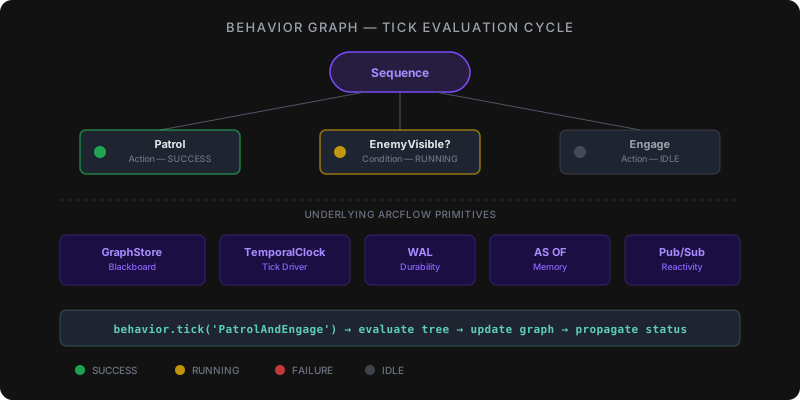
Behavior trees embedded in a persistent world model — they tick against live spatial-temporal state, persist across restarts, and remember their full history.
Standard behavior tree engines (UE5, BT.CPP) operate in isolation from the world model: they lose all state when the process exits, limit their blackboard to key-value lookup, and can't answer "what was the agent doing 5 minutes ago?" ArcFlow's Behavior Graph stores tree structure and blackboard state inside the same WAL-backed world model as your entities, positions, and relationships. Trees tick against live graph state, carry full temporal history with AS OF queries, and thousands of concurrent agents share a single world model — with zero external infrastructure.
-- One call ticks the tree; state persists across restarts
CALL behavior.tick('PatrolAndEngage')

-- Query agent history: what was it doing at a recent checkpoint?
MATCH (n:BehaviorNode) AS OF seq 800 RETURN n.name, n.status
The Mapping#
If you've used behavior trees before, everything maps directly:
| Concept You Know | ArcFlow Equivalent | What ArcFlow Adds |
|---|---|---|
| Behavior Tree | Workflow subgraph | Persistent, queryable, versioned |
| Blackboard | World model graph | Full GQL queries, not just key-value |
| Tick | CALL behavior.tick('name') | ArcFlow Clock Domains, temporal history |
| Node Status (SUCCESS/FAILURE/RUNNING) | Fact lifecycle (8 states) | Decay, supersession, dispute resolution |
| Sequence Node | Workflow steps (sequential) | WAL-durability, retry policies |
| Selector / Fallback | Conditional step | Graph-pattern predicates, not just booleans |
| Parallel Node | Parallel step with barriers | All/Any/N completion modes |
| Decorator (Retry, Timeout) | Retry policy, throttle config | Rate limiting, dead letter queues |
| Live-Trigger Sequence | Live queries + subscriptions | GQL-based live queries |
| Subtree | Nested workflow definition | Partition-isolated scope |
Define a Behavior Tree#
A behavior tree is just a graph. Nodes are :BehaviorNode entities, edges are :CHILD relationships with ordering:
-- Define the tree structure
CREATE (root:BehaviorNode {type: 'Sequence', name: 'PatrolAndEngage'})
CREATE (patrol:BehaviorNode {type: 'Action', name: 'Patrol',
  btQuery: 'MATCH (w:Waypoint) RETURN w'})
CREATE (detect:BehaviorNode {type: 'Condition', name: 'EnemyVisible',
  btQuery: 'MATCH (e:Enemy) WHERE e.distance < 50 RETURN e'})
CREATE (engage:BehaviorNode {type: 'Action', name: 'Engage',
  btQuery: 'MATCH (e:Enemy) SET e.targeted = true'})

CREATE (root)-[:CHILD {order: 0}]->(patrol)
CREATE (root)-[:CHILD {order: 1}]->(detect)
CREATE (root)-[:CHILD {order: 2}]->(engage)
Tick the Tree#
One call evaluates the entire tree — walking children in order, propagating SUCCESS/FAILURE/RUNNING up the graph:
CALL behavior.tick('PatrolAndEngage')Query the Blackboard#
The blackboard isn't a separate key-value store. It's the entire graph. Query it with full GQL:
-- What enemies are targeted?
MATCH (e:Enemy {targeted: true}) RETURN e.name, e.distance

-- What waypoints has the agent visited?
MATCH (w:Waypoint {visited: true}) RETURN w.name ORDER BY w.visited_at

-- What does the agent know about the world?
MATCH (a:Agent)-[:KNOWS]->(fact) RETURN fact
Temporal Awareness#
Every state change is recorded. Ask what the agent knew at any point in time:
-- What was the agent's state at a recent checkpoint?
MATCH (n:BehaviorNode) AS OF seq 800 RETURN n.name, n.status

-- Replay a decision sequence
CALL db.temporalReplay('patrol_run_42')

-- Compare behavior across two time windows
CALL db.temporalCompare(
  'MATCH (e:Enemy {targeted: true}) RETURN count(*)',
  'MATCH (e:Enemy {targeted: true}) RETURN count(*)'
)
Node Types#
Standard behavior tree node types, stored as graph nodes:
Action Nodes#
Execute a GQL query against the world model:
CREATE (n:BehaviorNode {
  type: 'Action',
  name: 'AttackNearest',
  btQuery: 'MATCH (e:Enemy) WHERE e.distance < 20
          SET e.health = e.health - 10 RETURN e'
})
Condition Nodes#
Evaluate a GQL query — SUCCESS if rows returned, FAILURE if empty:
CREATE (n:BehaviorNode {
  type: 'Condition',
  name: 'HasAmmo',
  btQuery: 'MATCH (a:Agent {ammo: true}) RETURN a'
})
Sequence Nodes#
Tick children left-to-right. Stop on first FAILURE:
CREATE (n:BehaviorNode {type: 'Sequence', name: 'AttackSequence'})Selector (Fallback) Nodes#
Tick children left-to-right. Stop on first SUCCESS:
CREATE (n:BehaviorNode {type: 'Selector', name: 'FindTarget'})Parallel Nodes#
Tick all children simultaneously. Configurable completion:
CREATE (n:BehaviorNode {
  type: 'Parallel',
  name: 'PatrolAndScan',
  completion: 'all'  -- 'all' | 'any' | number
})
Decorator Nodes#
Wrap a child with retry, timeout, or inversion logic:
CREATE (n:BehaviorNode {
  type: 'Decorator',
  name: 'RetryAttack',
  decorator: 'retry',
  max_retries: 3,
  backoff: 'exponential'
})
Tick Loop Integration#
Game Loop (10 Hz)#
const rt = new Runtime();
const session = rt.session();

// Define tree
session.execute(`CREATE (root:BehaviorNode {type: 'Sequence', name: 'NPC_Guard'}) ...`);

// Register for ticking
session.execute(`CALL behavior.register('NPC_Guard')`);

// Game loop
setInterval(() => {
  session.execute(`CALL behavior.tick('NPC_Guard')`);
}, 100); // 10 Hz
Robot Control Loop (ROS2-style)#
import arcflow

db = arcflow.open("robot_brain.db")

# Register mission tree
db.execute("CALL behavior.register('DeliverPackage')")

# Control loop at sensor rate
while robot.is_active():
    db.execute("CALL behavior.tick('DeliverPackage')")
    status = db.execute("CALL behavior.status('DeliverPackage')")

    if status == 'SUCCESS':
        db.execute("CALL behavior.register('ReturnToBase')")
AI Agent Loop (LLM orchestration-style)#
import arcflow

db = arcflow.open("agent_memory.db")

# Agent reasoning tree
db.execute("""
  CREATE (root:BehaviorNode {type: 'Selector', name: 'ResearchAgent'})
  CREATE (check:BehaviorNode {type: 'Condition', name: 'HasAnswer',
    btQuery: 'MATCH (a:Answer {confidence: true}) RETURN a'})
  CREATE (search:BehaviorNode {type: 'Action', name: 'SearchKnowledge',
    btQuery: 'CALL algo.graphRAG("user question") YIELD node RETURN node'})
  CREATE (ask:BehaviorNode {type: 'Action', name: 'AskLLM',
    btQuery: 'CALL llm.complete("synthesize answer from context")'})
  CREATE (root)-[:CHILD {order: 0}]->(check)
  CREATE (root)-[:CHILD {order: 1}]->(search)
  CREATE (root)-[:CHILD {order: 2}]->(ask)
""")

# Agent loop
while True:
    db.execute("CALL behavior.tick('ResearchAgent')")
    result = db.execute("MATCH (a:Answer) RETURN a.text")
    if result:
        break
Why This Matters#
Existing behavior tree implementations each solve part of the problem:
- UE5's BT — C++ only, tied to Unreal, no persistence across sessions
- BehaviorTree.CPP — solid library, but state is ephemeral and not queryable
- ROS2 nav2 — uses BT.CPP, scoped to navigation only
- AI agent frameworks — no structured behavior model, ad-hoc state in JSON/dicts
ArcFlow Behavior Graph combines the BT mental model with graph-native infrastructure:
- WAL-backed persistence — trees and state survive process restart
- Temporal reasoning — query any agent's state at any past timestamp via
AS OF - Graph-queryable blackboard — full GQL over the world model graph, not key-value lookup
- ArcFlow Clock Domains — sensors tick at independent rates, each domain maintains its own sequence, ArcFlow merges into a coherent view
- ArcFlow Evidence Model — edges carry observation class, confidence score, and provenance chain (0.0–1.0)
- GPU acceleration — graph algorithms and vector search route to CUDA / Metal automatically
Compared to Other Approaches#
Game Engine Behavior Trees?#
Your BT Blueprint nodes map to :BehaviorNode graph nodes. The Blackboard becomes the full graph. Environment queries become GQL patterns. The difference: ArcFlow trees persist across restarts, carry temporal history, and scale to thousands of concurrent agents sharing a single world model. Trade-off: ArcFlow runs outside the game engine process, so you need FFI or MCP integration for tight game-loop coupling.
C++ Behavior Tree Libraries / ROS2?#
Same tick-based evaluation model. ArcFlow adds WAL-durable persistence, GQL queries as conditions/actions, multi-robot coordination via partitioned workspaces, and temporal sensor fusion via ArcFlow Clock Domains. Trade-off: dedicated BT libraries have lower per-tick overhead for pure in-memory evaluation; ArcFlow's advantage is queryable persistent state and multi-agent coordination.
LLM Orchestration Frameworks?#
Replace your agent's ad-hoc state dict with a persistent world model. Behavior trees give your agent structured decision-making instead of prompt chains. algo.graphRAG() + behavior tree ticking = agents with persistent memory and traceable reasoning. Trade-off: higher initial setup than a state dict, but the graph pays for itself when you need to debug agent decisions or coordinate multiple agents.
Procedures#
-- Register a behavior tree for tick evaluation
CALL behavior.register('TreeName')

-- Tick a registered tree (evaluates all nodes, propagates status)
CALL behavior.tick('TreeName')

-- Get current status of every node in a tree
CALL behavior.status('TreeName')

-- List all registered behavior trees
CALL behavior.list()

-- Unregister a tree from tick evaluation
CALL behavior.unregister('TreeName')Architecture#
Behavior Graph is a thin orchestration layer over existing ArcFlow primitives — no separate engine, no new storage:
| BT Concept | ArcFlow Primitive |
|---|---|
| Tree structure | Graph nodes + :CHILD edges |
| Tick clock | ArcFlow Clock Domains |
| State persistence | WAL (write-ahead log) |
| Blackboard | World model graph |
| Conditions | GQL queries (row count > 0 = SUCCESS) |
| Actions | GQL mutations |
| Live conditions | Live queries + subscriptions |
| Memory | Temporal AS OF queries |
| Trust | Confidence scores + provenance |
Vision#
ArcFlow's behavior graphs serve as the coordination layer for autonomous systems.
Multi-agent coordination. Behavior trees coordinate through shared graph edges, enabling coordinated behavior across hundreds of agents without a central orchestrator. A guard NPC detects an intruder, writes a fact to the graph, and every patrol agent's behavior tree reacts on its next tick.
Persistent NPCs and long-lived agents. Behavior graphs survive process restart, with lifecycle management for agents that run for days or weeks — accumulating knowledge, refining confidence scores, and adapting behavior trees based on observed outcomes.
Autonomous systems with safety boundaries. Behavior graphs driving real-world actuators (robots, vehicles, industrial controls) support formal safety constraints: invariant checks that halt a behavior tree before it can violate a safety property, with the full temporal log available for post-incident analysis.
Spatial-temporal fusion. Behavior trees that reason over spatial state (sensor data, positions, zones) and temporal state (what happened, when, in what order) in a single query language. This is the foundation for robotics mission planning and autonomous vehicle decision-making.
See Also#
- Use Case: Behavior Graphs — lightweight implementation sketch and architecture overview
- Use Case: Autonomous Systems — multi-agent fleet coordination with behavior trees
- Live Queries —
LIVE MATCHfor condition nodes that fire on world model state changes - Triggers —
CREATE TRIGGERto invoke a skill when an entity is created or modified, wiring behavior tree inputs to sensor events - Programs — bundle perception skills and trigger bindings for a sensor pipeline into a single installable manifest
- Temporal Queries —
AS OF seq Nto replay agent decision history - Spatial Queries — spatial condition checks (proximity, zones, sensor ranges)